Friday, January 10, 2020

Manatee Madness!

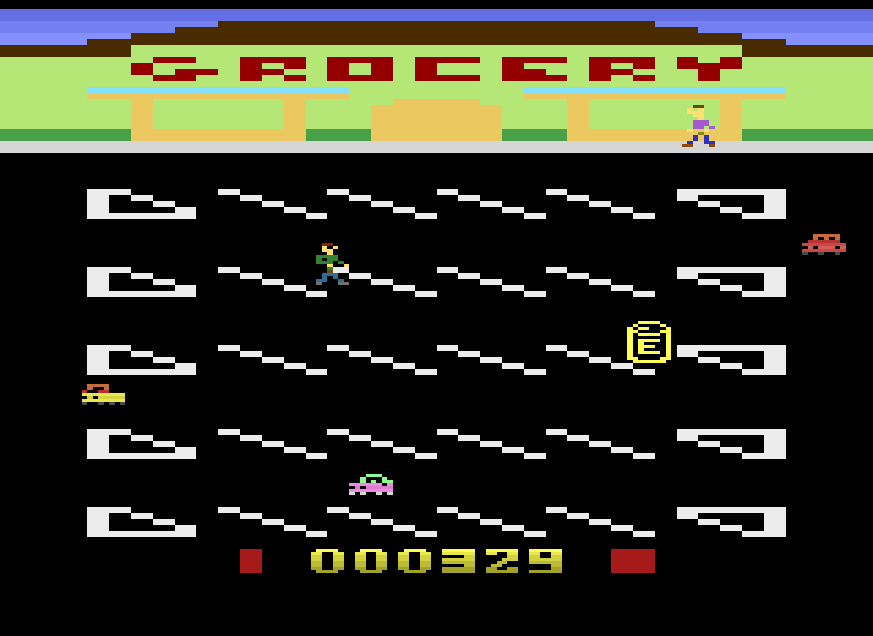
Stage work is coming along nicely, with the foundations laid down for the Rain, Snow, and Volcano stage. The Black Friday stage is proving a little more difficult but I believe part of that lies with the car movement code which needs reworking since it is a remnant of the early program - the car code was some of the first things I programmed.

While working on Bag Boy I had created several test programs to work on various ideas to see if they worked and then I'd they did I would integrate them into Bag Boy. If things didn't work out I discarded the program and moved on. This is how I came to use the DPC+ kernel. After initial progress with the standard kernel learning batari Basic I quickly learned of some of the limitations and tested out the Multi-Sprite kernel before landing on the DPC+ kernel.

One such test program survived these periodic purges and has gained a life of it's own.  It is called Manatee Madness!

I created that program to work in a simpler framework to determine better movement code, difficulty progression, and stage selection. I also wanted to continue working on sound effects, bit operations, and a higher definition titlescreen.

Essentially this program works similar to Bag Boy!  You play as a Manatee and must survive the day avoiding boaters, tourists and divers, fishermen, red tide, and alligators. Each stage is a part of the day - morning, afternoon, evening, and night. Each part has its own threats. The manatee must surface for oxygen periodically and not get hurt. Some injuries take health, some oxygen, and some both.

Anyway, here is a link to Manatee Madness test video. Bag Boy is not being abandoned but I was surprised at how quickly this test program turned into a game of it's own and will continue to serve as a test for my main project - Bag Boy!


Sunday, December 15, 2019

Stages!

After a little bit of work I started hammering out some of the foundations for each stage.  While I already had the rain stage established with lightning and playfield changes, I wanted to start making other stages so that I can move onto the game logic some more.  I made 2 more stages - a snow stage and a volcano stage.

Now I know what some may be thinking - why have a volcano stage in a shopping cart game.  Part of the reasoning behind such a strange choice was that years ago when I worked for Albertsons I found an illustrated disaster preparedness guide in the offices.  It covered everything from storms to riots, earthquakes, and volcano eruptions.  I wish I could find that book again because it was truly amazing and it has been so long and so obscure that I am slowly questioning the validity of my memory.

Anyway, while I got these stages set up, I started on a transition playfield and this is where I got into a problem - cycle overrun.


The television screen would display the news forecast for each stage - rain, snow, lava, etc.  This would be kind of reminiscent of Paper Boy and the newspapers.  I also considered adding a fun easter egg using this as a game over screen...


I believe it stems from the previous game logic conflicting with the code for the transition screen.  While I needed to reprogram some of those sections, now it is pretty much necessary to redo those portions of the game before proceeding.

Mainly, it is the movement code for the virtual sprites and the power up generation code.  The latter should be easier but I am considering various other possibilities.  My thoughts are moving most of the movement game logic to a different bank and utilize bitwise operations to select the various conditions and some skip codes for the transition or game over screens.

Overall, I am pretty satisfied with what I am coming up with.  I want some more stages with varying elements but I think this next step will make everything else simpler.


Thursday, December 12, 2019

Let it Snow...

It has been a few months since the last update. A change in commute has eaten up much of my programming time and my time to type during the day has been iffy at best. I finally had a vacation to tackle some of my game issues. While this was not the reason for my vacation, I decided I would work on my game. Unfortunately life got in the way of significant progress but I did make one development - the playfield for the other stage or wave of carts.

Previously I had just a rain stage and was hung up on just how exactly the levels would progress. I somewhat settled using number of carts. Now I made the snow stage. The logic for the stages will come later as I determine difficulty but my plans are to alter movement and the lack of visible parking spaces make judging distance a little more difficult.

I am considering a couple other playfields, including a volcano stage. These scenarios are based out of an emergency guide I had seen when working at Albertsons years ago.

If the transitions of stages works well enough I may make some bonus stages. Right now I am in the beginning phases. I decided to place the playfield change code in bank 3 and I currently have plenty of space. I still have much more to implement but it is nice to progress a little.


Monday, June 24, 2019

Still on Lightning!

With every little moment I inch towards completion of one task.  Today I have gotten the collision between Bag Boy and the lightning closer to being done. Now, when collision is detected the Bag Boy sprite cycles through an electrocution shock graphic.  To save space with variables I tied the graphics to the manager and customer movement variable since they are always walking.  This way once shocked the code just reads the new information for the Bag Boy sprite.  

I had dealt with an over cycle issue at first but I believe that was a result of some old "god mode" code so the playfield kept redrawing whenever the score hit a certain number and/or the cart counter hit a certain number.  this caused a lot of subroutines to be jumping back and forth.  As soon as I eliminated the old code I did not see any more over cycling.  

The next step would be to work on the player "death" code.  Currently he respawns at the entrance immediately.  When hit by a car I wanted to change the graphic to Bag Boy fall down and as with the lightning, I want Bag Boy to remain at the last place he was until the button is hit.  I had found a delay would be good because immediately re-spawning can cause the player to repeatedly run into the same obstacle and lose all their lives in an instance.  I may still let the time go so the loss of life also acts as a penalty and encourages the player to restart instead of waiting it out for when it is advantageous. 

Sunday, June 23, 2019

Lightning

  • I have the lightning code almost done. It flashes, appears, and then stays on the screen. I altered the code to have the lightning chase you if Bag Boy is holding the shopping cart but for some reason the lightning will stay when there is a stage change so I suspect there is a line somewhere that I forgot about that is interfering with the game. 

Friday, June 21, 2019

Altered and Stage Ideas

Typically when I get a chance to program during the week, it is usually during my lunch. Because of time limitations I try to tackle small projects in these sessions so today I decided to play around with the lightning code since this was an issue mentioned by the Zero Page Homebrew channel.

I had tried extending the lightning Sprite while keeping with the quick flash of the sky. I didn't get it to work probably because of how I implement the flash by changing the background color set to a variable. As I was playing around with the code, I eventually had the lightning flash a couple times as it had before and then have it go in the direction of Bag Boy. I will probably change this to only follow Bag Boy when he has the cart in his possession.

This action has a couple functions. First, it causes the lightning to remain on the stage (as some mentioned) while also retaining the quick flash element from before (that I personally liked more). I thought this also makes more sense being Bag Boy would be holding a metal cart.  I may decide on a slightly different method since I want to avoid flicker or may have behavior of the lightning Sprite tied to difficulty progression, kind of like how the manager's movement changes as things get harder.

Also as a side note, my 6-year-old suggested I make another stage that is at night. I really liked this idea because I was trying to think of something else I could do to increase difficulty. I was thinking of having pfpixels appear down the middle of the aisles to act as a barrier but using nighttime should be easy once I get the stage code done. The hardest part would be changing the graphics of the cars.

What I considered was either swap the sprites with one of just headlights and brake lights because I could utilize the same code for every Sprite, or I would just change the colors of the cars, but that may fill up my graphics bank and I may not want that if I decide to add more animations.

Thursday, June 20, 2019

Playfield Change!

I had been wracking my brain for the last couple months on the playfield change.  My goal was to have "stages" where the game would alternate every so often to a "rain stage" or "snow stage."  Essentially I had wanted some gameplay variation and difficulty progression and to do this I wanted to simulate changing weather.  For testing purposes I made the playfield change when the score hit a certain number.  That seemed to work but the only problem I was experiencing was that the playfield colors never reverted back to normal after the stage was completed... until now.

While I am sure there are better ways to accomplish this goal (I am still working on learning the code for changing the colors for certain lines of the playfield), currently when conditions are met the playfield colors will change. Based on some of the suggestions from the Zero Page Homebrew channel, I am shifting the stages from score-driven changes to cart-driven, meaning that each stage is completed when x number of carts are collected. For example, if every stage lasts 10 carts, the rain stage would begin at 10, snow at 20, and so on.

What I am thinking of doing is having a variable for the number of carts collected.  Once that hits the chosen number it will set off another variable which will then determine which stage. I was considering 25 as a good number of carts and I think I might have a sprite animation appear each time the cart is delivered to the manager (maybe once every 5 carts so as to not waste space). 

I only have the beginnings down but now that this hurdle is met it should be no time until I have the parameters for each stage met, such as altered movement.  I do plan on keeping the additional cars to appear at different score intervals so that if players try to rush power ups they are met with increasing difficulty sooner than later.

Sunday, June 16, 2019

Not Much New Except Some Profanity!

I have had a couple busy months (not on the programming front).  I have made some minor code adjustments here and there but no significant game developments.  I am still working on implementing the stage change code, with the lightning and rain, so that once I have that solidified making the snow stage should be easier.

Over the last couple months Bag Boy! was featured on Zero Page Homebrew channel where they played the game in essentially a God mode, where they got the general feel for what was going on.  One suggestion someone had made on their channel was to make the top customer the manager yelling at Bag Boy Q-Bert style.  I loved this for multiple reasons, one being it easier to identify the sprite in my code and typing so instead of referring to "Customer 1" and "Customer 2" or whatever, I can refer to one of the sprites as a "Manager."  The other reason was for aesthetics and visual variation.  It is a simple way to add something to the game without really adding something to the game.  I also thought it is a nice callback to the classics.

I spent a couple days trying to develop some sprites and code for the talk bubble but after some thought and simplification, I worked it into the power-up code since I had intended to have the power-ups appear less frequently.  I didn't quite like the appearance since I had to place the bubble several pixels above the Manager to avoid flicker.  I do not want any prolonged flicker in the game other then the periodic flicker from the shopping cart crossing the path of a car.  I had also planned on programming the sprite to be activated only when the symbol would be over one of the letters that spell "GROCERY" since it would stand out since the sprite was single color, with the symbol being clear.

Then today I was playing Q-Bert on my Flashback Portable and noticed the way the speech was implemented in the game.  While I was thinking more along the lines of the arcade game with the speech bubble, the Atari port had the symbols just off to the side of Q-Bert.


A quick rewrite of some code got me this:


So while this little bit of code was a slight detour, I am quite pleased with the outcome.

I will probably mess with the configuration of the symbols.  I have so far settled on this:


I had thought that having them bunched up a little closer with the pound symbol on top made it more readable. Saved 400 bytes doing it this way.  Adding the cursing added virtually nothing to the original code.

Saturday, March 16, 2019

Fixed Collision Code

I had a lot of unnecessary or wrong code in my program from when I first learned it. I had collision statements between player1 and the virtual sprites. I simplified things immensely by consolidating like code and deleting the offending statements.

Overall I freed up about 700 bytes in the last few edits. This definitely helps. As I work on the rain stage (I just made the umbrella and am working on how it is initiated) I will hammer out the details on the remaining power-ups, mainly the energy drink. 

As for difficulty progression, the big thing I need to figure out is best way to collide with NUSIZ copies, how to incrementally increase speed the best way, and when to start changes.

If I figure out the rain stage easily, I will maybe do a snow stage too... 

Monday, March 11, 2019

Rain and Lightning

I was having trouble creating rain using either the ball or missile sprites as they would take on the color of the virtual sprites as they crossed y-coordinates but I had considered using another virtual Sprite for lightning. Player8 will be used and will flash when the playfield flashes. The lightning stays at the top of the screen but randomly appears on the x-axis and disappears.

I am not sure of the consequences but this would act as a deterrent for lingering around the top while cars pass. I had also played around with mirroring some of the car sprites and will stagger some of the duplication at different difficulty intervals.

This is something rather simple. The hard part I have been dealing with was music and Titlescreens. I had tried adding some sound effects to the lightning and could only manage a simple noise.  I was wanting to play a little series of notes whenever hit by a car to give the player some time while the car passes to prevent rapid life losses. I also want a transition screen for rain so that it doesn't immediately change colors and flash. 

Saturday, March 9, 2019

Fixed Car Spawning Again!

I haven't checked the cycle issue on hardware yet but in my search for a fix I discovered why my car spawning was off on a couple of the cars.

For power ups I utilize virtual Sprite player7 for all of the power ups since only one is on the screen at a time so I have a variable pick which Sprite will he player7. Before I did that I used several virtual sprites, each associated with a power-up.

When I had made the change to player7 I had forgotten to delete the redraw for a couple sprites so when I wrote the code using those virtual sprites for something else, when I ran the program it would seemingly redraw the placement of the cars in the course of the power up generation. I finally erased this code and now the car movement works fine.

I will update the movement of the cars for increased difficulty soon, especially since I freed up some space. 

Friday, March 8, 2019

Fixed Over Cycles?

This issue has boggled my mind for the last week and I have been stumped at every turn.  I had decided to consolidate some redundant code and move things around to make things more efficient.  Since actions like Bag Boy touching the various car sprites have the same result I moved all like code together and had each collision jump to the same spot and share the same code.  When I ran a test everything seemed to work but I also noticed the game didn't run over in cycles.

I entered "breakif {_scan>#262}" in the Stella debugger as well as monitor the cycle count on the top left of the screen in real time and didn't experience any overages. I am not sure if I had actually fixed the issue but it seems to have gone away. I will test on hardware soon but in the meantime I will continue to clean up code in Bank 2. This will give me space to add a couple things in the future if necessary. My changes on the player/car collision freed up 200 bytes so I am sure there are more opportunities to make space. 

Thursday, March 7, 2019

Screen Rolling

I had recently acquired a Harmony Cart and when I played my game on actual hardware it was amazing. Gameplay using an actual joystick added a whole new challenge but then something happened - the screen started rolling.

After some pointers on AtariAge I discovered my scanlines would go to 263 for a brief moment that was seemingly unnoticeable in emulation without proper viewing. After watching the scanline count it seemed random but tere was another odd situation. The top car would disappear after a bit and never return.

The only thing in common with the rain playfield and the car were they were both activated by an if/then statement tied to the score. I had deleted the whole car code and seemed to not experience a scanlines increase but my laptop battery was dying so testing will continue tomorrow.

Another thing I had an issue with was the rain. I tried using my code from before but it didn't work the same. I figured it was probably due to the fact that I am using the DPC+ kernel so the pixels are smaller and with multiple sprites and colors it was not as simple as before. The sprites appeared farther apart. To solve this I instead used a virtual sprite. It still didn't work the way I wanted but it kind of looked like lightning so I was thinking in the rain stage the lightning will come from the top of the screen and head toward the cart. You have to get the cart to the customer ASAP or risk getting fried. I may put in an option for the joy0fire button to release the cart to avoid shocking Bag Boy.

Depending on all this testing and what I want done with gameplay,  I may move the difficulty back to a separate bank to provide more gameplay code in bank 2, like player 2 control.

Tuesday, February 26, 2019

Game Play Test!

Game play test with cars, power ups, customers, and progressive difficulty. Needs tweaking but it is getting there!


I had also modified bottom-most x-coordinate for position, adjusted collision between lot customer and cart towards the bottom of the screen for playability, and modified the code for car movement.


Will be adding a second player option soon. The second joystick will operate the customer and cart, where the second player can alternate between the two with the press of the button.  I may have to work out some gameplay details so that the second player just torpedo the cart into the bottom cart every time.

Thursday, February 21, 2019

Power-Ups!

Finally!

I got the power-ups not only spawning but also disappearing when either touched by Bag Boy or on their own after a short duration!

Still working out the details but this will definitely speed things along... sort of.

Still gotta work out things like color, sound, effect, etc. but getting their existence right is a start and an important step.

I also shrunk them down for a couple reasons.  The first is because my wife wanted smaller power-ups because they were bigger than the car.  The second reason is to reduce flicker.  Once I tighten the spawning I will try to minimize overlapping of y-coordinates.


Power-Ups Almost Fixed!

I have almost solved the lingering power-up problem. Previously the power-up would spawn and when Bag Boy would collide with it it would stay. I had finally realized that with each loop I had a variable continually adding up. So at a particular value the variable would go to the generation subroutine but that variable would continue adding which seemed to negate the collision. To solve this I placed an if then line before the variable value that checked to see if it was the generation value. If yes it skipped the generation code and go to the collision detection. Then, once collision is detected it resets the value.

Once the bugs are worked out I will give each power up a specific ability and hammer out the randomization code to make it balanced. 

Saturday, February 16, 2019

Power Ups!


Originally I had the power up generator code initiate every time the timer hit a certain number.  This worked great but collision detection never worked.  After wracking my brain I recall that sometimes when the score goes below a certain number the cars added for difficulty stop moving and collision detection ceased to work in those instances as well.

So instead of tying power up generation to the timer I tied it to the score, with it initiating at greater than or equal to zero.  Then in the bank where the code was, I created another variable to mirror the timer variable.  Now the power ups generate as they should but with one small problem - I am having a problem getting rid of them promptly.

For instance, the energy drink appears. If the player sits over the drink at the time it eventually disappears they get the benefit (for testing purposes this is just 500 points).  I assume this has something to do with the timing.  I will investigate this further at a later time
 

Bugs fixed!

With some help on the AtariAge forums, it was pointed out that an error in my code was causing the screen to jump. It also came to my attention that the game was not capable of running on hardware, possibly due to the formatting of comments.

So with those changes implemented I had moved onto power-ups.

I had decided to place them in a separate bank and after trial and error think I had gotten their appearance and disappearance to work well.

Using the timer variable, I have the power-ups checked at one point each cycle. At that point anotger variable is randomized. It has the chance of becoming a few things:


  • A watch - that provides more time on the timer. 
  • An energy drink - that will allow for increased speed. 
  • Money - increased score. 
  • 1up - an extra life. 

There is also a slight possibility no power-up is picked. When the variable corresponds to one the others are pushed off screen. The variable then continues to increase. Once it reaches a certain point it disappears.

The timer then goes through it's next cycle and performs it's check again. Depending on how tings work, there may be greater chance for no power-up.

I may also add another power-up  - an umbrella.

I hope to add a couple more things for progressive difficulty, with the big thing being rain. I think I can implement this by randomising the ball Sprite for the appearance of rain and modifying movement. I was thinking an umbrella could be used to minimize movement issues.

Obviously I would be utilizing more than 9 virtual sprites so I plan on having player9 switch what it is depending on the situation.

I have also not determined the color and size of the power-ups. Part of me want each Sprite to have it's own colors while I also want ten to flash. I also don't know if they should appear as large as the player0 sprite or if I should make them smaller to minimize flickering. 

Thursday, February 14, 2019

Status Bar!


I got the status bar and life counters working thanks to some help from the AtariAge forums.  While the mini kernel would not work, Tony the 2600 pointed me in the right direction with some sample code he had used to implement simple bar and counters, which is perfect since it fills the graphic void on the bottom of the screen and provides me with a stepping stone to continue gameplay elements.

Now that the life counters are implemented, I will work on making them decrease when a collision is detected between Bag Boy and a car.  I may also have a loss of life when the counter runs down.

As for the counter, I plan on having it slowly decrease until you get the cart to the customer, when the counter will be replenished.  Customer #2 and collisions between the cart and the cars will also cause incremental decreases.

Because of this gameplay elements I will have added random power-ups - a 1UP and a clock for more time.  The only other power up I was considering at the moment was an energy drink that when consumed speeds up Bag Boy's movement.  I may also have a double energy drink that can speed him up and freeze the clock but that has yet to be determined. 

Wednesday, February 13, 2019

Progress on Difficulty

I freed up some variables in the movement section being that Bag Boy's X and Y movement are the same value. I then used those variables for the additional cars so that I may link their movement to a separate one as difficulty progresses. I will next try and determine how to best adjust values as score progresses to make it more difficult.

Once I have the mechanics figured out I will work on a power up or two,  like an energy drink that allows for faster movement when the button is pressed but I do not want to implement that until I can figure out a status bar because I will undoubtedly want some kind of timed element to keep the game moving.

I had also did some minor housekeeping and improved on the playfield graphics. 

Manatee Madness!

Stage work is coming along nicely, with the foundations laid down for the Rain, Snow, and Volcano stage. The Black Friday stage is proving ...